
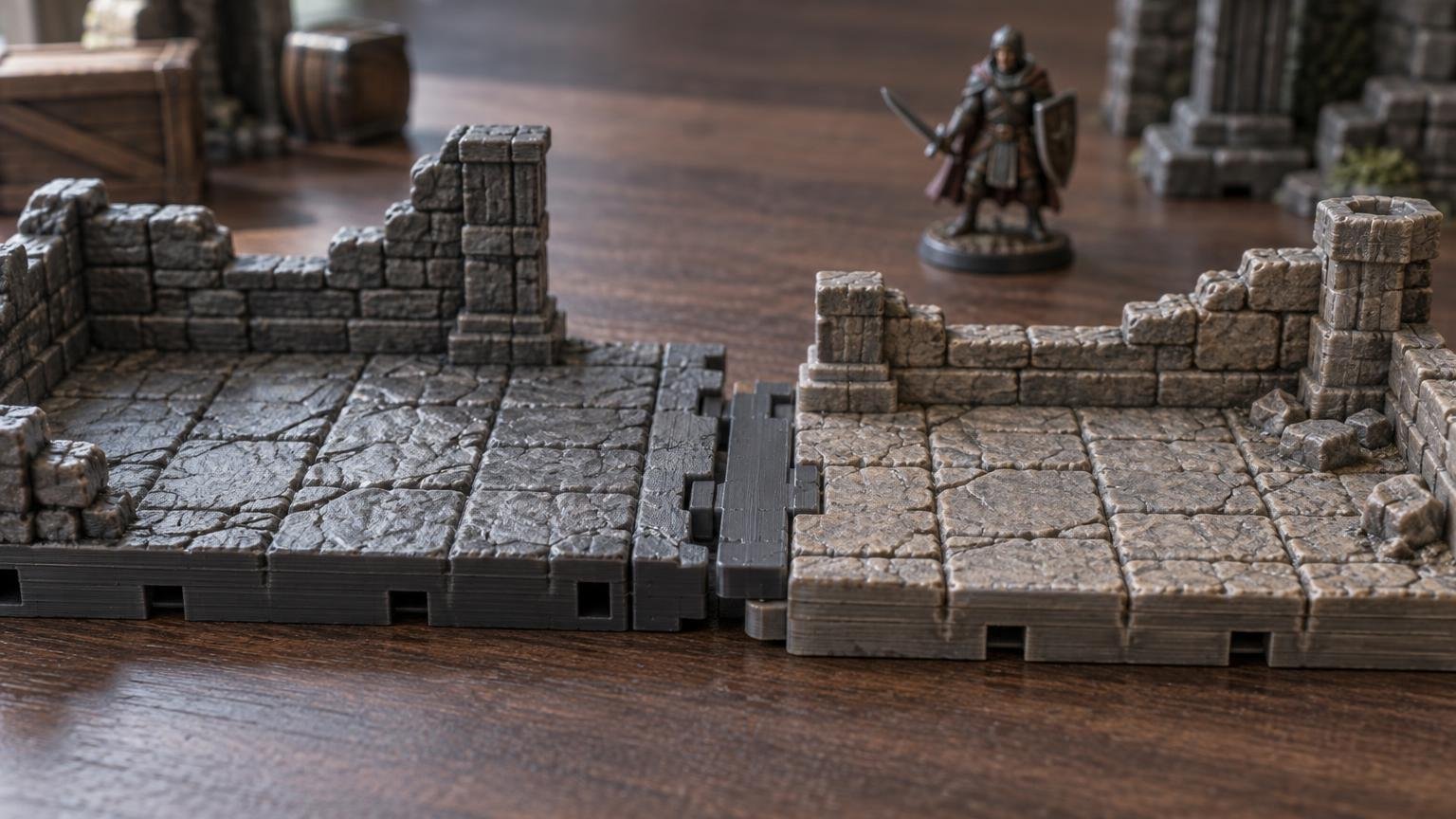
TLDR
OpenLOCK-to-Dragonlock adapter clips make sense when you already own terrain from both systems and need a limited number of useful crossover points. Both Fat Dragon Games and Printable Scenery publish adapter files intended to bridge Dragonlock and OpenLOCK connectors. They do not establish universal compatibility between every tile, wall, or terrain family. Fat Dragon Games’ Dragonlock adapter page lists a Dragonlock-to-OpenLOCK clip, while Printable Scenery’s adapter listing offers its own beta adapter file.
Print a few adapters and representative terrain pieces before converting an entire collection. Check connector tension, floor alignment, wall placement, height transitions, visible seams, and whether miniatures can move across the join. If those features disagree, a clip can hold the pieces together without making them function like one coherent system.
What the adapter actually connects
OpenLOCK is Printable Scenery’s modular terrain connection system, built around standardized clip locations. Its documentation also describes top-centre pins for vertically stacking compatible pieces. Dragonlock Ultimate is Fat Dragon Games’ modular 28 mm terrain system, and its pieces use proprietary Dragonbite clips.
An adapter provides a mechanical transition between those connector formats. That is useful, but narrow. It does not automatically change the footprint, grid spacing, wall position, floor thickness, exterior profile, texture, or elevation of either terrain piece. Think of it as a bilingual connector, not a universal terrain translator.
This distinction matters because modular dungeon compatibility depends on grids, walls, and connector placement working together. OpenLOCK’s design guidance requires standardized tessellation and exact port locations, with flush contact faces intended to limit gaps. An adapter cannot compensate for terrain whose adjoining faces or playable geometry do not line up.
The available adapter files are not one interchangeable edition
Fat Dragon Games lists a “Dragonlock to Openlock adaptor clip (v3)” on its DRAGONLOCK Ultimate: Adaptors page. The same page also lists a separate Dragonlock-to-Infinitylock adapter. Its accessible text describes downloadable STL files, although it does not show a current price or a visible direct checkout or download control for the adapter set.
Printable Scenery separately lists an “OpenLOCK/Dragonlock Adapter” as a free beta ZIP containing STL files. Its product history says that file was updated on December 21, 2017, to match Dragonlock v3.0.
Do not assume those two listings contain identical models merely because they address the same crossover. Their names and status labels differ, and the available documentation does not establish that they are interchangeable editions. Choose one documented file, preserve its original filename and source, and test it before printing a large batch.
When mixing OpenLOCK and Dragonlock makes sense
You are joining two collections you already use
Adapters are most valuable when they unlock terrain that would otherwise remain isolated. A few transition points may let an older room connect to a newer corridor, or allow one building section to sit securely beside another collection. That can be more efficient than reprinting a complete dungeon in a single standard.
The transition can be placed deliberately
A mixed connection is easier to manage at a doorway, corridor, bridge, courtyard entrance, or other narrow boundary. These locations limit the number of adjoining faces and make small visual or dimensional differences less disruptive. Trying to alternate systems across every edge of a large room creates many more opportunities for gaps and alignment errors.
The playable geometry already agrees
Connector fit matters only after the pieces make sense together on the table. OpenLOCK documentation uses a 1-inch dungeon tile standard of 25.4 mm and describes 50.8 mm as two inches. It lists standard full-height walls at 50.8 mm and half-height walls at 25.4 mm, while allowing other wall heights. Those reference dimensions help you inspect an OpenLOCK piece, but they do not prove that a particular Dragonlock set shares every relevant dimension.
Place representative pieces side by side before printing adapters in quantity. Inspect whether the floor grids continue cleanly, walls consume similar amounts of playable space, doorways meet sensibly, and elevated surfaces create a usable transition.
When an adapter is the wrong solution
- The connector ports are present, but the adjoining faces cannot sit flush.
- The floor grids shift enough to interfere with miniature placement or movement.
- Wall positions create a pinch point, blocked square, or awkward corner.
- One terrain family uses a noticeably different floor or foundation thickness.
- The connection must carry a tall or top-heavy structure that places too much leverage on a small clip.
- You need every tile to connect in every orientation rather than a few controlled transition points.
- The mixed textures, wall heights, or edge profiles create more table friction than the extra terrain is worth.
In those cases, a freestanding boundary may work better. A doorway, scatter piece, rubble strip, bridge, or short transition corridor can visually connect two terrain families without forcing incompatible edges into mechanical alignment.
A practical adapter test workflow
- Select one straight edge from each terrain system. Avoid beginning with corners, stairs, stacked walls, or unusually decorated pieces.
- Confirm that both ports are clear. Some OpenLOCK ports include small sacrificial supports at the mouth that must be removed before inserting a clip.
- Print only a few adapters using the file publisher’s starting settings. Keep the STL source and version recorded so later batches do not silently change.
- Let the parts cool before testing. Forcing a clip into a warm or obstructed port can confuse a print-cleanup problem with a dimensional-fit problem.
- Insert and remove the adapter several times. Look for whitening, cracking, excessive bending, edge damage, or a fit that relaxes immediately.
- Connect the terrain on a flat surface and inspect the floor seam, wall line, vertical alignment, and rocking.
- Place miniatures near the transition and handle the assembly as you would during a game. A connection that looks acceptable in isolation may still snag bases or separate during rearrangement.
- If the test succeeds, print a small working batch before committing to enough adapters for the entire collection.
Start with the publisher settings, then diagnose fit
Printable Scenery lists 10% infill, no supports, and a 0.2 mm layer height for normal-quality FDM printing of its beta adapter. It lists 0.1 mm layers as the high-quality option. These are starting settings for that listing, not a guarantee that the adapter will fit every printer, filament, port, or terrain release.
Do not automatically substitute the settings from Printable Scenery’s general OpenLOCK clip files. That separate listing recommends FDM printing, 15% infill, and a 0.2 mm normal layer height. The adapter and ordinary clips have distinct product guidance.
If the adapter is too tight, inspect the port for debris or sacrificial supports before changing scale. Then check first-layer expansion, flow, dimensional calibration, and rough seams on the clip. If it is loose, inspect for under-extrusion, thin walls, damaged ports, or shrinkage differences. Printable connector fit can shift with printer behavior, material formulation, flow, and dimensional calibration.
Change one variable at a time and keep an untouched reference print. Scaling a connector is a blunt adjustment because it changes every dimension at once; it can improve one side while making the other side worse. A calibrated printer and clean ports are better starting points than repeatedly resizing the STL.
For a broader setup framework, use these FDM settings for tabletop terrain and pay particular attention to first-layer quality, perimeter formation, layer adhesion, and dimensional fit.
Check version labels without treating them as compatibility guarantees
Printable Scenery currently identifies OpenLOCK 8.6 as its system and template version and OpenLOCK Clip 5.4 as its latest clip version. Those are separate version tracks. The beta OpenLOCK/Dragonlock adapter listing, meanwhile, records its update to Dragonlock v3.0 in 2017.
That does not by itself prove that an older adapter will fail with a particular current model. It does mean the version labels should be recorded and tested rather than treated as decorative text. Keep one known-good adapter with your collection so you can compare later prints against it.
A connector test is not a complete compatibility test
| Check | What success looks like | What the adapter cannot fix |
|---|---|---|
| Mechanical fit | The adapter inserts securely without damaging either port | Ports located in the wrong place |
| Floor alignment | Miniatures can cross the seam without an awkward step | Different floor or foundation thickness |
| Grid continuity | Playable squares remain understandable across the join | Mismatched footprints or grid spacing |
| Wall geometry | Walls meet without blocking intended playable space | Different wall placement conventions |
| Table handling | The connection survives normal setup and rearrangement | Excessive leverage from tall or heavy assemblies |
| Visual transition | The seam is acceptable for the intended encounter | Unrelated textures, profiles, or architectural styles |
Judge the complete interface rather than celebrating the first successful click. The useful question is not merely whether the pieces connect, but whether the resulting room remains stable, readable, reachable, and easy to use during play.
The practical verdict
OpenLOCK-to-Dragonlock adapters are a sensible bridge for targeted joins between compatible pieces. They are especially useful when they preserve an existing terrain investment or connect two collections at deliberate transition points.
They are less convincing as the foundation for a collection that expects every piece from both systems to combine freely. Before printing a bag of clips, test one representative connection and evaluate the grid, wall placement, floor height, seam, handling strength, and miniature clearance. If all of those work, the adapter is doing useful terrain work. If only the ports connect, you have solved the smallest part of the compatibility problem.
Frequently asked questions
Are OpenLOCK and Dragonlock directly compatible?
They use different connector formats. Published adapter files are intended to bridge the OpenLOCK and Dragonlock connection types, but direct terrain compatibility also depends on port placement, adjoining faces, footprints, floor levels, walls, and other geometry.
Is the Printable Scenery adapter free?
Printable Scenery currently lists its beta OpenLOCK/Dragonlock Adapter as a free ZIP containing STL files. Because availability can change, confirm the listing before planning a large project around it.
Should I print the adapter with supports?
Printable Scenery’s listing specifies no supports for its beta adapter. That guidance applies to its file and intended orientation; inspect the sliced preview before printing rather than assuming every similarly named adapter has the same requirement.
Can I resize an adapter that fits too tightly?
You can experiment with dimensional compensation, but first remove port obstructions and check extrusion, first-layer expansion, seams, and printer calibration. Uniform scaling changes both interfaces and may solve the fit on one side while creating a problem on the other.
How many adapters should I print first?
Print only enough for a few representative connections. Test straight edges before corners or elevated assemblies, then expand the batch after confirming repeated insertion, floor alignment, wall continuity, and normal table handling.
References
- DRAGONLOCK™ Ultimate: Adaptors – Fat Dragon Games
- OpenLOCK/Dragonlock Adapter – Printable Scenery
- OpenLOCK Clips – Printable Scenery
- OpenLOCK developer information – Printable Scenery
- Removing supports from the OpenLOCK ports – Printable Scenery
- Modular Dungeon Tiles Explained: Grids, Walls, Connectors, and What Actually Matters – printablerealms.com